



 Enrico Palmerino

AI bookkeeping can help your firm serve more clients, reduce repetitive data entry, and create capacity for advisory work. But there’s an important condition: the data going into your system needs to be clean.
You’ve probably heard the phrase “garbage in, garbage out.” It applies perfectly here. If your chart of accounts is inconsistent, your bank feeds are incomplete, and your recurring rules contradict one another, your AI bookkeeping platform has a difficult job. It is learning from noise.
The good news? Data hygiene is not a massive, one-time overhaul. With a focused cleanup plan, you can give your AI better information and make automation more reliable. Botkeeper reports 98% accuracy on AI-posted entries when the system has the right data and workflows to work from.
So, where should you start? Let’s take a look.
Why data hygiene matters for AI bookkeeping
AI bookkeeping systems learn from historical transactions, account mappings, vendor patterns, documents, and human corrections. That means your setup directly affects what the system predicts next.
Does that mean you need perfect books before using AI? Not at all. In fact, AI can help you identify and resolve inconsistencies. But you do need a clear foundation and a process for correcting errors as they appear.
The opportunity is significant. An Intuit review of AI accounting tools cites research showing that generative AI can handle 30% to 46% of manual tasks performed by white-collar workers. For accounting firms, that time can move away from repetitive data entry and toward review, analysis, and client advisory.
Here are five practical steps to improve your data hygiene and help your AI bookkeeping perform at its best.
1. Clean up your workflows before you clean up the data
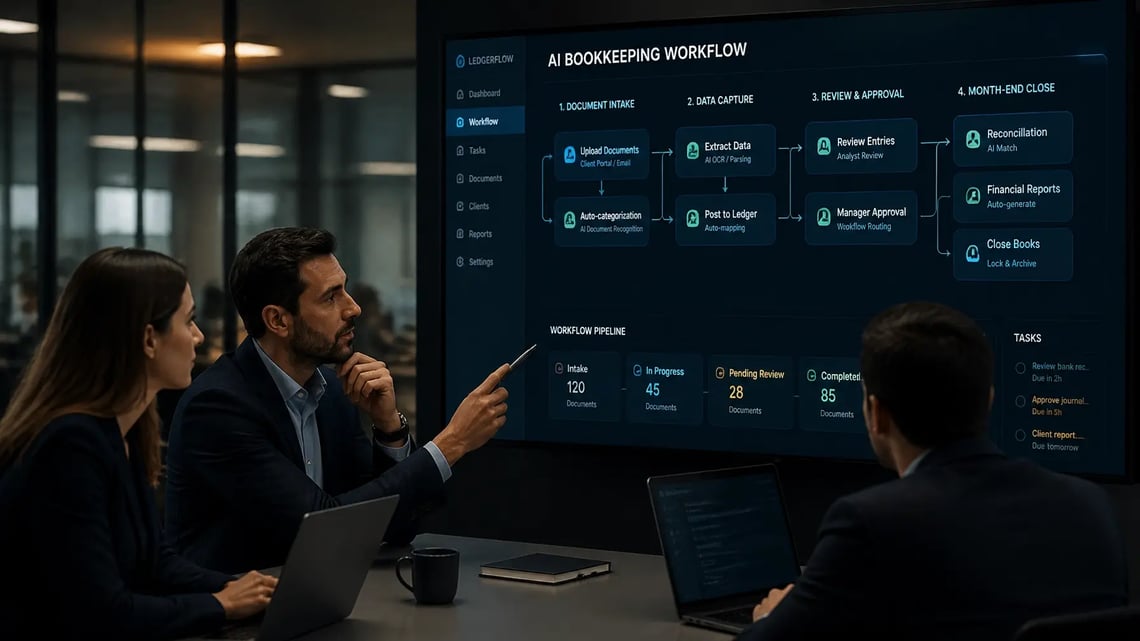
Before reviewing account names or transaction rules, document how work actually moves through your firm.
Why? Your AI cannot consistently follow a process that exists only in someone’s memory.
Start by mapping the lifecycle of a typical client:
- How do bank feeds and documents enter your system?
- Who reviews or categorizes transactions?
- When are exceptions escalated?
- Who approves journal entries?
- What happens before and during month-end close?
- Where are client requests and outstanding tasks tracked?
Look for variations between teams and clients. If one bookkeeper sends missing-receipt requests by email while another uses a task platform, you have a workflow problem: not an AI problem.
Create simple firm-wide standards for:
- Transaction review and approval
- Client document requests
- Exception handling
- Month-end close procedures
- Naming conventions
- Review deadlines
- Escalation paths
Your goal is not to make every client identical. It is to create a repeatable operating model that still allows for client-specific requirements.
Tools such as Botkeeper Infinite’s Work module can help centralize recurring tasks, document requests, and workflow ownership. When the process is visible, your team can improve it: and your AI has a more consistent environment to learn from.

2. Standardize the chart of accounts
Your chart of accounts is the language your AI uses to understand the business. If that language is vague or inconsistent, the results will be inconsistent, too.
Start by reviewing each client’s chart of accounts for:
- Duplicate or overlapping accounts
- Unused accounts
- Excessive “miscellaneous” categories
- Vague labels such as “Other Expense”
- Inconsistent account numbering
- Accounts that mix unrelated activities
- Missing classes, locations, or departments where those dimensions matter
For example, if software subscriptions are sometimes coded to “Technology,” sometimes to “Office Expense,” and sometimes to “Miscellaneous,” the system receives conflicting signals. Which treatment should it learn?
Establish clear naming and mapping standards. A firm-level template can help, but avoid forcing every client into a structure that does not reflect their business. Instead, define the core accounts and principles that should remain consistent.
A useful account should answer a straightforward question: What economic activity belongs here, and what does not?
You should also decide how to handle historical cleanup. Changing years of old transactions all at once can create new reporting problems, so use a controlled approach:
- Identify the accounts with the highest volume or highest error rate.
- Review recent transaction history.
- Create the new mapping.
- Reclassify transactions carefully.
- Monitor reports and AI predictions after the change.
The cleaner the account structure, the easier it is for AI to categorize transactions and for your team to review exceptions quickly.
3. Fix recurring transaction rules
Recurring transactions are often where AI bookkeeping delivers some of its biggest efficiency gains. They are also where bad rules can quietly create repeated errors.
Think about common examples:
- Monthly software subscriptions
- Rent and utilities
- Payroll-related transactions
- Loan payments
- Merchant fees
- Recurring owner distributions
- Insurance premiums
- Scheduled transfers between accounts
Review the rules already in place. Are any outdated? Do multiple rules apply to the same transaction? Are conditions too broad? Are there exceptions that the rule does not account for?
A good recurring rule should specify:
- The transaction description or identifying pattern
- The expected vendor or customer
- The account to use
- Any class, location, or department
- Whether the amount is fixed or variable
- Whether supporting documentation is required
- What should happen when the transaction changes
For example, a rule for a monthly software vendor may work well when the amount is stable. But if the vendor also bills implementation services, you may need a more specific condition to prevent every payment from being coded the same way.
Do not create rules for every unusual transaction. That can make your system harder to manage. Use deterministic rules for high-volume, predictable activity and let the AI flag unusual items for review.
This is where a human-in-the-loop model matters. Botkeeper’s Transaction Manager is designed to integrate high-confidence transactions while flagging others for review. Your team can correct exceptions without manually reprocessing every transaction.
Long story short, good rules reduce noise. Bad rules multiply it.

4. Keep customer and vendor profiles tidy
AI looks at more than transaction amounts. It also considers names, descriptions, historical treatment, and relationships between transactions and supporting documents.
That makes customer and vendor profiles especially important.
Begin by searching for duplicate records. Common causes include:
- Different abbreviations
- Alternate spellings
- Punctuation differences
- Old legal names
- Multiple profiles created by different team members
- Changes in ownership or billing entities
Create a consistent naming convention and merge duplicates where appropriate. Then review the information attached to your most active vendors and customers.
For each major vendor, consider documenting:
- Preferred name
- Default expense or cost-of-goods-sold account
- Typical transaction frequency
- Expected amount range
- Required receipt, bill, or invoice
- Tax treatment
- Class, department, or location
- Any allocation requirements
Customer profiles deserve the same attention. Make sure revenue accounts, payment terms, locations, and service categories are mapped consistently. This is particularly important for firms serving clients with subscriptions, retainers, project billing, or multiple revenue streams.
What happens when profiles are tidy? The AI has stronger context for categorization, document matching, and exception detection. Your team also spends less time asking, “Which version of this vendor is the right one?”

5. Set up clean documents and bank feeds
Even the best AI bookkeeping workflow will struggle if its source data is incomplete.
Start with your bank feeds. Confirm that every relevant bank account, credit card, payment processor, and financial institution is connected. Then check that the feeds are importing transactions completely and without duplicates.
A basic feed quality review should include:
- Comparing imported transactions with the latest bank statement
- Checking for missing dates or gaps
- Identifying duplicate imports
- Confirming that account balances are reasonable
- Reviewing disconnected or expired connections
- Reconciling opening balances
- Verifying credit cards and payment platforms separately
Do this before scaling automation across a large client group. A broken feed can create a backlog of work that is much harder to unwind later.
Documents matter just as much. Set a standard for where invoices, receipts, statements, contracts, and other supporting records should live. Define who can access them and how missing documents are requested.
Botkeeper’s Documents module provides centralized document storage with standardized client folder structures. Smart Connect helps firms connect client financial data without relying on scattered passwords, spreadsheets, or manual logins.
You should also define practical document rules. For example:
- Require receipts for transactions over a specific threshold.
- Require invoices for recurring vendors.
- Request bank statements on a monthly schedule.
- Flag transactions without expected documentation.
- Set deadlines for client uploads before close.
Clean feeds provide complete transactions. Clean documents provide context. Together, they give your AI much more to work with.

Keep your data hygiene clean after the initial cleanup
Data hygiene is not a “set it and forget it” project. New vendors appear. Clients change banks. Rules become outdated. Employees create duplicate profiles. That is normal.
The key is to create a maintenance rhythm.
Consider reviewing these metrics monthly:
- Percentage of transactions posted without changes
- Percentage of transactions sent for manual review
- Number of duplicate vendors or customers
- Number of missing-document requests
- Bank-feed exceptions
- Reconciliation discrepancies
- Time from transaction import to completed review
- AI accuracy by client, account, or transaction type
Botkeeper Infinite includes tools such as Bot Review and Transaction Insights to help firms identify exceptions, review performance, and understand how automation is working across client books.
And what if your team is nervous about trusting AI? That concern is understandable. The answer is not to remove human oversight: it is to focus human attention where it adds the most value. A hybrid approach lets AI handle predictable work while your team reviews exceptions, applies judgment, and improves the system over time.

Better data creates better capacity
Your AI bookkeeping platform is not a magic box. It is a system that learns from the information, rules, and decisions your firm provides.
When workflows are consistent, charts of accounts are clear, recurring rules are accurate, profiles are tidy, and feeds and documents are complete, your AI has a much better chance of performing at full capacity.
That is the payoff: fewer repetitive corrections, faster month-end review, cleaner books, and more room to grow your client base without sacrificing quality. With Botkeeper Infinite’s reported 98% accuracy on AI-posted entries, better data hygiene can help your firm get more value from automation while keeping your people firmly in control.
Ready to assess your firm’s bookkeeping data hygiene? Explore Botkeeper Infinite or talk with our team about building a cleaner, more scalable workflow.